Research
Analyze documents as a whole, follow every reference, and cite exactly what matters
Written By Lina Pridat Hauschild
Last updated About 5 hours ago
Overview
Every legal answer has to show where it comes from. Checking that usually means opening the statute, the decision, or your own file, finding the right passage, and then following the references it contains.
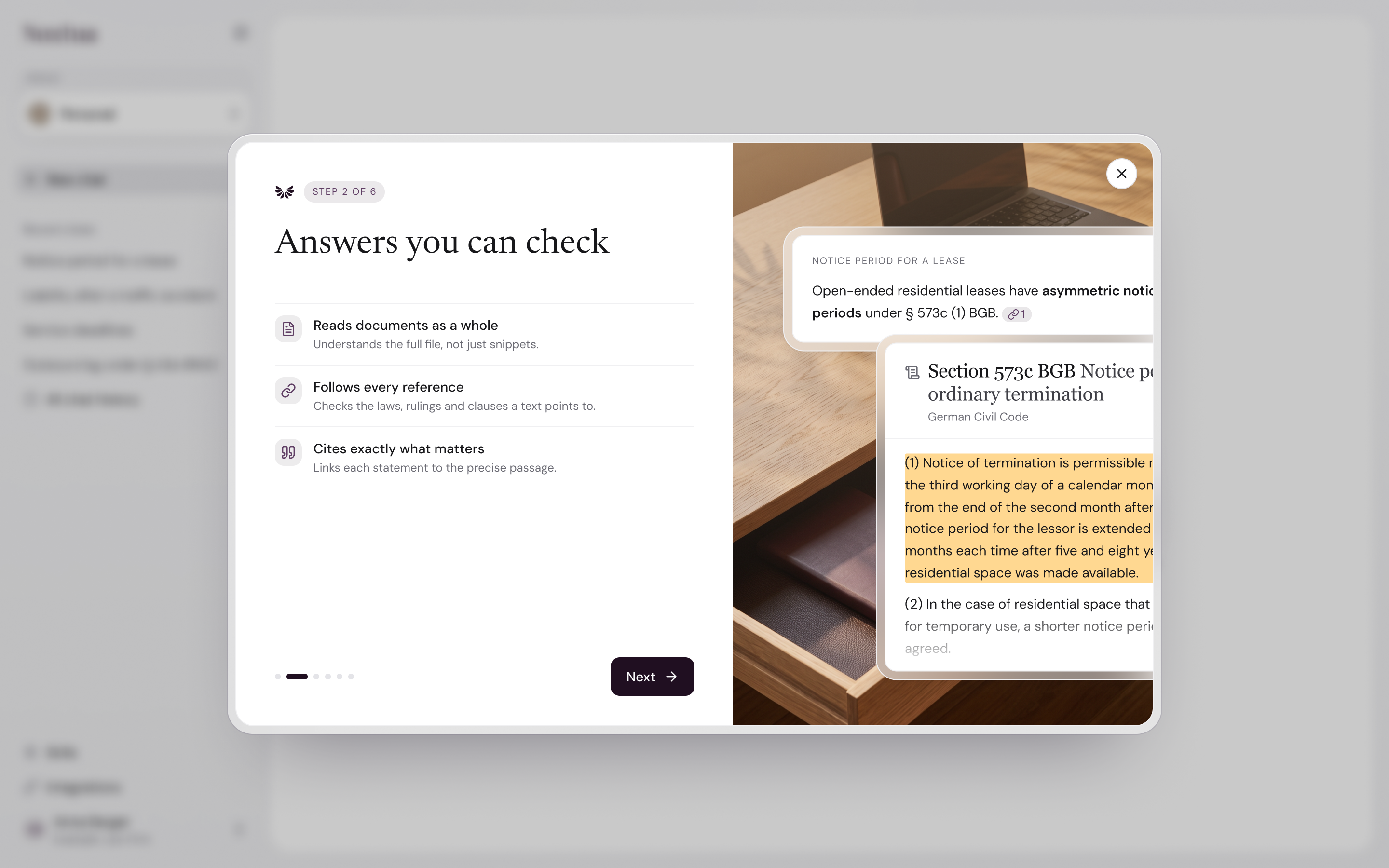
Research with Noxtua does it all in one place. Noxtua reads your documents in full, looks up the legal sources, and adds a numbered citation to each statement. Click a citation, and the source opens beside the chat, scrolled to the exact passage and highlighted. From there, you can switch to the answer's other citations.
Where it lives: In the chat of the Noxtua web app, in your Personal space, and inside projects.
How it connects: Citations work the same way for legal sources and for files you upload, including files in a Project. Answers from a Skill, such as contract review, cite their sources the same way. Copy replaces each citation with the source’s title in brackets, so a pasted answer still makes sense in a memo. Export chat creates a Word document with numbered citations and a list of sources at the end.
What you can use this for
Verify an answer before you rely on it. Click each citation to read the passage it cites, highlighted in the full text of the statute, decision, or commentary.
Find the clause that matters in a long document. Ask about a 200-page contract or filing, and jump straight to the cited passage on its page instead of scrolling.
Follow the line of authority. Open a decision, then click the norms and decisions it references. Each one opens in the same viewer, so you can trace the chain step by step.
Review a contract against the law. Ask whether a clause complies with a statute. The answer cites both your contract and the provision, and you can open them one after the other.
Hand over the research with its sources. Copy the answer, and each citation becomes the source's title in brackets, for example, "(BGB § 823)". Export the chat to get a Word document with numbered citations and a list of sources.
How it works
The flow has four steps: get a cited answer, open a source in full, move between citations, and follow links within a source.
1. Get a cited answer
Purpose: See which source supports each statement while you read.
In the chat, check the Jurisdiction selector. It is fixed for the chat once the first answer arrives.
Add your documents if the question concerns them: click + or type @, then choose Upload from computer or from a document already in the chat or project.
Ask your question, then press Enter. The timeline above the answer shows what Noxtua is reading and searching for.
In the answer, look for the small numbered markers after each statement. A legal source's marker carries the publisher's mark.
Under the answer, a list such as 3 sources used shows each cited source once, in the same order as the markers appear.
Result: Every statement that relies on a source includes a marker. Only sources the answer actually cites are listed, while all sources Noxtua checked before the final answer are listed under the thinking process of each output. While the answer is still being written, a marker can display a spinner until the source is confirmed.
2. Preview a citation and open the full text
Purpose: Quickly check the cited passage, then read it in context.
Point at a marker (or move to it with Tab). A preview card displays the source's title, type, and the cited passage.
To read more, click Read more on the card or click the marker itself.
The source opens in the viewer next to the chat. Noxtua scrolls to the cited passage and highlights it.
For a legal source, the header displays the source type, court, decision date, and file reference, where available. Click Open publisher original (new tab) to view it on the publisher's website.
To close the viewer, click × in the viewer's header.
Result: You read the passage in the source's full text, not as an isolated snippet. The marker you opened remains highlighted in the answer.
3. View the other citations
Purpose: Check all sources of an answer, or of the entire chat, one after the other.
With the viewer open, click another marker in the answer. The viewer switches to that source and its passage. The current source remains visible until the next one has loaded.
Or click a source in the sources used list below the answer.
To view all sources cited in this chat, open the side panel (In this chat) and expand Sources. Sources are grouped into Legislation, Court decisions, Commentary, Journal articles, Soft law, and your uploads.
Each source in the panel shows the citation numbers for the newest answer that cites it. Click a number to open the source at that passage.
Result: You can work through every citation without losing your place. The source on screen is highlighted in the panel, and its marker is scrolled into view in the answer.
Limits
FAQ
Where can I see which source a statement comes from?
Where can I see which source a statement comes from?
Look for the numbered marker after the statement. Point at it for a preview, or click it to open the source at the cited passage. The list under the answer, for example 3 sources used, shows all sources.
Why does a citation open the document but not highlight anything?
Why does a citation open the document but not highlight anything?
Either the statement is about the source as a whole, the passage is longer than 3,000 characters, or the passage could not be matched, for example, in a scan or a document edited since. Noxtua then shows "This citation could not be found in the source document." You can still read and search the source.
How do I access other sources of an answer without closing the viewer?
How do I access other sources of an answer without closing the viewer?
Click the next marker in the answer or a source in sources used. The viewer switches to it. For all sources of the chat, open Sources in the side panel.
Can I click references in a law or decision?
Can I click references in a law or decision?
Yes, when the publisher links them. A reference opens the linked source in the same viewer, and footnotes jump within the text. Links to external websites are not followed.
Why does Noxtua list fewer sources than it searched?
Why does Noxtua list fewer sources than it searched?
Only sources that the answer actually cites are listed. The timeline above the answer shows everything Noxtua searched and read.
Can I see the source on the publisher's website?
Can I see the source on the publisher's website?
Yes. Click Open publisher original (new tab) in the viewer's header.
Do the citations survive when I copy or export the answer?
Do the citations survive when I copy or export the answer?
Yes. Copy replaces each marker with the source's title in brackets, for example, "(BGB § 823)". Export chat creates a Word document with numbered citations and a list of sources at the end.
Can Noxtua cite the wrong passage?
Can Noxtua cite the wrong passage?
Yes, Noxtua can make mistakes. Check important statements in the source. If a citation is incorrect, use Report response and choose Wrong source.
Was this helpful?